
By default, ReferralStack creates a commission whenever a referred customer makes a successful payment. However, if you want to exclude specific payments from generating commissions (for example single payout session, subscription, invoices ) you can skip commission creation by adding a metadata flag to the payment object.
Skip Commission Using Metadata
To prevent ReferralStack from creating a commission for a particular payment, attach the following metadata:

Where to Add the Metadata
To skip a commission for a payment, you need to add the referralstack: 'false' metadata to any one of the relevant Stripe objects before the payment is processed. ReferralStack will check these objects during the payment event, and if it finds the flag, it will skip creating a commission.
You can add the metadata to:
Checkout Session – When creating a Stripe Checkout Session, include the flag in the
metadataobject. This is the most common approach for one-time payments or subscriptions.Subscription – If you add the flag to a subscription, all invoices generated for that subscription will skip commission.
Invoice – Useful when skipping commission for a specific invoice (e.g., a one-time setup fee) without affecting other payments.
Charge / Payment Intent – Can be used for direct charges or special payments processed outside of invoices or subscriptions.
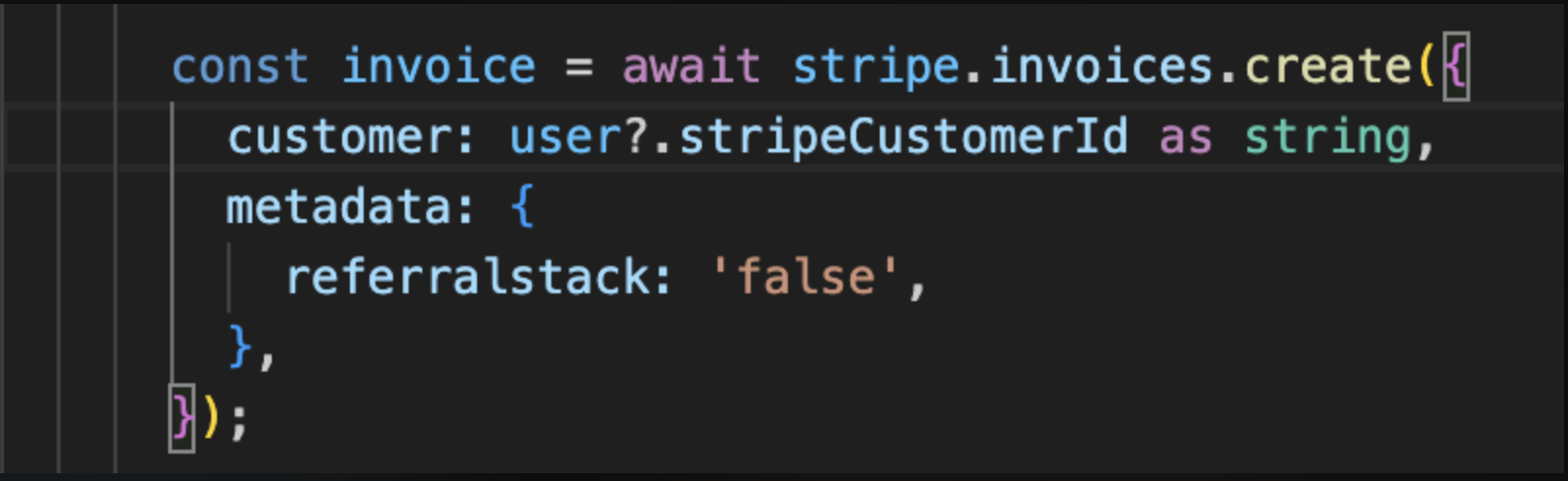
Example — Skip generating a ReferralStack commission.
During invoice creation, you can pass referralstack: 'false' in the metadata to skip generating a ReferralStack commission.
Conclusion
Adding the referralstack: 'false' metadata allows you to selectively skip ReferralStack commissions for specific payments. By attaching this flag to the appropriate Stripe object whether a Checkout Session, Subscription, Invoice, or Charge you gain full control over which transactions generate commissions, ensuring flexibility and accurate tracking for your referral program.